VSP Finds is reader-supported. When you buy through links on our site, we may earn an affiliate commission at no extra cost to you.
Digital art has never been more accessible, and 2026 brings excellent drawing tablets at every price point. Whether you are sketching your first character, retouching photos, or shopping for a creative kid, these five picks cover everything from classic pen tablets to full pen displays with laminated screens.
Wacom Intuos Small Graphics Drawing Tablet

Product Description
The Wacom Intuos remains the gold-standard starter tablet. Its 4,096-level pressure-sensitive pen feels natural immediately, four customizable ExpressKeys speed up your workflow, and the bundled training plus creative software gets beginners producing real work on day one. It is compact, durable, and works with Windows, Mac, and Chromebook.
HUION Inspiroy H640P Drawing Tablet

Product Description
HUION’s Inspiroy H640P offers remarkable value in a slim 6×4-inch package. The battery-free stylus delivers 8,192 levels of pressure sensitivity, six programmable press keys keep shortcuts under your fingers, and it plugs into a phone or computer for on-the-go sketching, note-taking, and remote teaching. A perfect low-risk entry into digital art.
12-Inch LCD Writing Tablet for Kids (2 Pack)

Product Description
For young artists, this two-pack of 12-inch LCD drawing boards is a screen-time win. Kids get colorful, pressure-responsive lines with zero mess, a one-button erase, and a lock switch to protect masterpieces. They are feather-light, easy on the eyes, and inexpensive enough to keep one in the car and one at home.
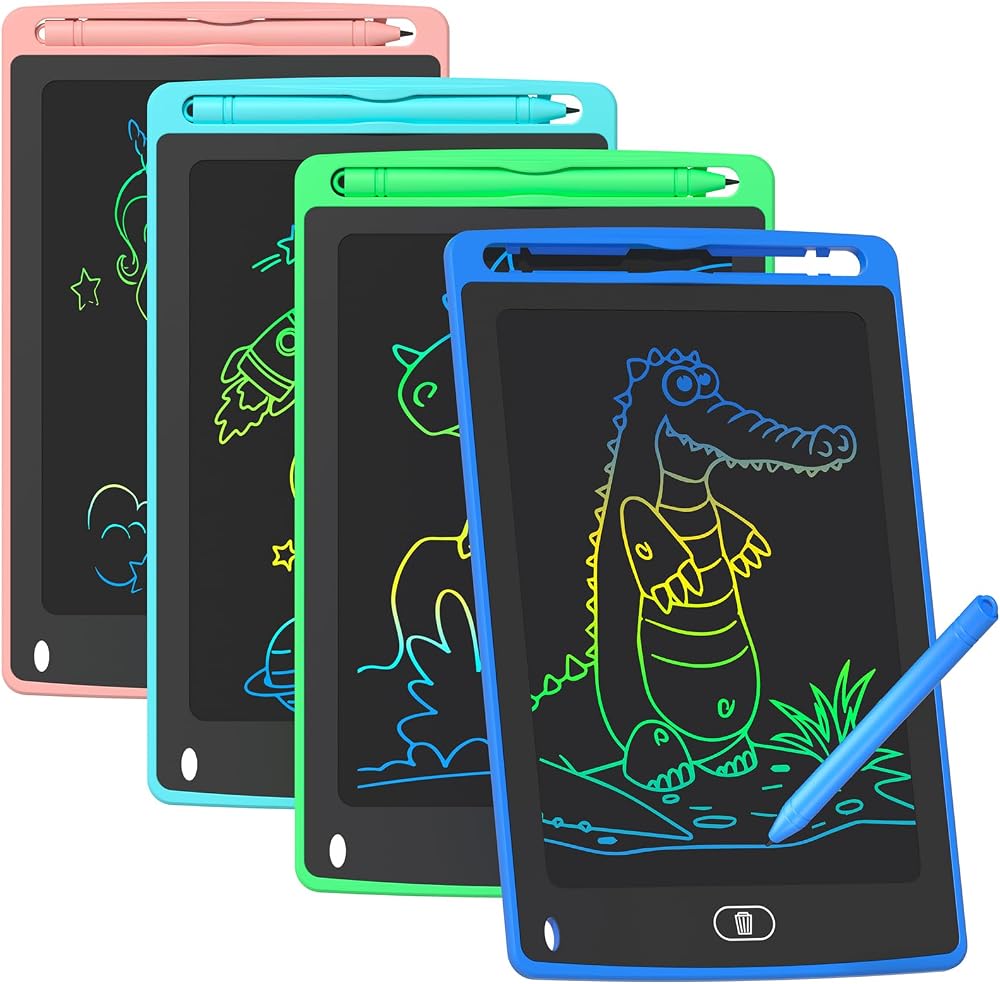
8.5-Inch Colorful Doodle Board (4 Pack)
Product Description
This four-pack of 8.5-inch doodle tablets is the ultimate party-favor and travel bundle. Each board draws in vibrant rainbow colors, erases instantly, and runs for months on a replaceable battery. Great for road trips, restaurants, math practice, and quick household notes — one for every kid and one for the fridge.
HUION Kamvas 13 (Gen 3) Pen Display Tablet

Product Description
Ready to draw directly on a screen? The Kamvas 13 Gen 3 gives you a 13.3-inch fully laminated display, a wide color gamut, and a pen with tilt support and virtually no parallax. It is the most affordable way to get that draw-on-canvas feel professionals love, and it doubles as a second monitor.
How to choose a drawing tablet
The biggest decision is pen tablet versus pen display. Pen tablets like the Wacom Intuos and HUION H640P are cheaper and more durable — you draw on the tablet while watching your monitor. Pen displays like the Kamvas 13 let you draw directly on a screen, which feels more natural but costs more.
Pressure sensitivity determines how naturally lines respond to your hand: 4,096 levels is plenty for beginners, while 8,192 gives finer control for shading and calligraphy. Also check for tilt support if you like pencil-style strokes, and battery-free styluses so there is one less thing to charge.
Match the size to your desk and workflow. Small tablets travel well and suit compact desks, while larger active areas help with broad arm strokes. For kids, simple LCD boards are the right call — durable, mess-free, and cheap enough that losing one is no tragedy.
Frequently Asked Questions
Do I need a computer to use a drawing tablet? Pen tablets and most pen displays connect to a computer, but many, including the HUION models here, also work with Android phones and tablets. Kids’ LCD boards are fully standalone.
Which tablet is best for absolute beginners? The Wacom Intuos or HUION H640P. Both are affordable, nearly indestructible, and supported by every major art app, so you can learn fundamentals before investing in a pen display.
Related tech guides
If you are building out your setup, check out our guides to e-ink tablets, ergonomic mice, macro pads, or browse every pick on our All Tech Finds hub.
Final Thoughts
Start with the Wacom Intuos if you want the safest beginner pick, or the HUION H640P to spend even less. Serious hobbyists should jump straight to the Kamvas 13 pen display — it is the pick that will grow with your skills — while the LCD boards keep younger artists happily doodling for hours.