VSP Finds is reader-supported. When you buy through links on our site, we may earn an affiliate commission at no extra cost to you.
A hot laptop is a slow laptop. When temperatures climb, processors throttle back, fans scream, and performance nosedives — especially on thin gaming and creator machines. A cooling pad is the cheapest performance upgrade you can buy in 2026, and these five picks range from silent office slims to RGB wind tunnels.
havit HV-F2056 Slim Laptop Cooling Pad

Product Description
The havit HV-F2056 has been the default recommendation for years, and it still earns the crown. Three large, quiet fans push plenty of air through its metal mesh surface, the slim profile slides into a backpack alongside your 15.6 to 17-inch laptop, and dual USB ports mean it never steals a port from your setup.
Kootek Laptop Cooling Pad with 5 Quiet Fans

Product Description
Kootek’s five-fan design lets you toggle fan groups on and off to balance airflow against noise. Six height settings dial in a comfortable typing angle, front stoppers keep the laptop planted, and the price sits comfortably in budget territory. A versatile all-rounder for work-from-home desks.
llano V12 RGB Gaming Laptop Cooler

Product Description
The llano V12 is the premium pick for serious gaming laptops. Its powerful turbo fan and sealed contact design actively pull heat from the laptop’s underside — dropping temps far more than passive mesh pads — while the RGB lighting matches a battlestation aesthetic. If your machine throttles under load, this is the fix.
TECKNET Laptop Cooling Pad with 9 Quiet Fans
Product Description
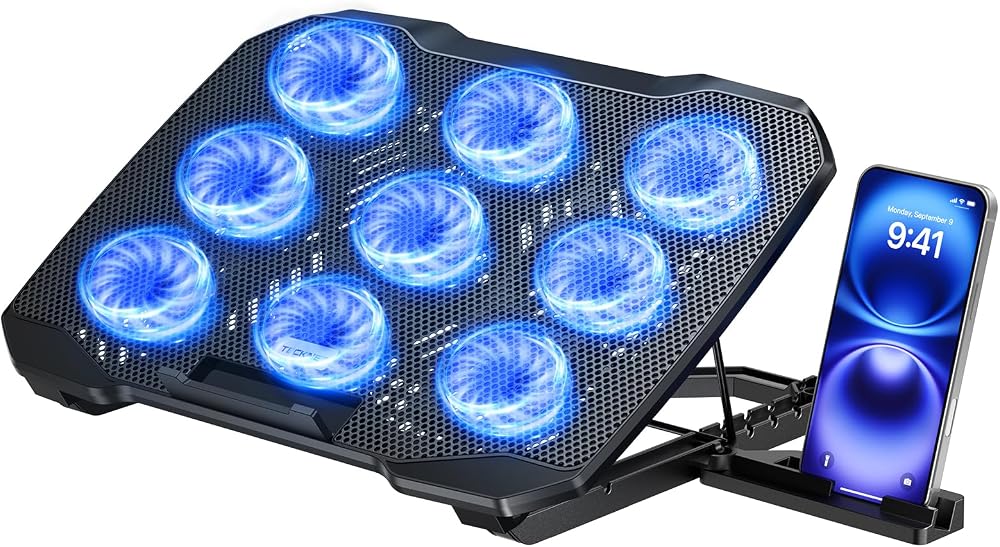
Nine fans sounds like overkill until a summer heat wave meets a rendering deadline. The TECKNET blankets the entire chassis in airflow, includes a handy phone stand, and keeps noise surprisingly civil thanks to many small fans running slower rather than a few running flat-out. Excellent coverage for larger laptops.
ICE COOREL Gaming Cooling Pad with 8 Fans

Product Description
The ICE COOREL pairs eight cooling fans with adjustable wind speed and multiple height angles at a value price. Two USB ports, a stable metal mesh deck, and strong airflow make it a smart pick for students running games and coursework on the same hard-working machine.
How to choose a laptop cooling pad
Match the pad style to your laptop’s problem. Mesh pads with multiple fans (havit, Kootek, TECKNET) provide broad, quiet cooling for everyday overheating. Turbo-style active coolers like the llano V12 create a sealed high-pressure zone that cuts deeper into gaming temperatures but costs more.
Size and ergonomics matter as much as airflow: confirm the pad fits your laptop’s footprint (17-inch machines need full-size decks), then look for adjustable height settings — a raised typing angle reduces wrist strain and improves under-chassis airflow at the same time.
Check the power and noise story. Pads powered by a single USB port with pass-through keep your ports free, fan-speed controls let you trade noise for cooling on demand, and many small fans generally run quieter than two large ones at the same airflow.
Frequently Asked Questions
Do laptop cooling pads actually work? Yes — expect roughly 5 to 15°C lower temperatures depending on the laptop and pad. That is frequently the difference between thermal throttling and sustained full performance in games and renders.
Will a cooling pad shorten my laptop’s battery life? Fans draw only a couple of watts over USB. The slight draw is usually offset by the laptop’s own fans working less hard, so the net effect on battery is minimal.
Related tech guides
If you are building out your setup, check out our guides to laptop docking hubs, external SSDs, monitor light bars, or browse every pick on our All Tech Finds hub.
Final Thoughts
The havit HV-F2056 remains the easy default for most laptops — quiet, slim, and proven. Gamers with hot-running machines should spend up on the llano V12’s active cooling, while the Kootek and ICE COOREL deliver maximum fans per dollar. Your laptop’s fans (and your lap) will thank you.